How to Register for PulseTV Everywhere
- Go to www.wtve.net or click on the Register Now button above.
- Select “Loveland PulseTV” from the dropdown box as your TV provider.
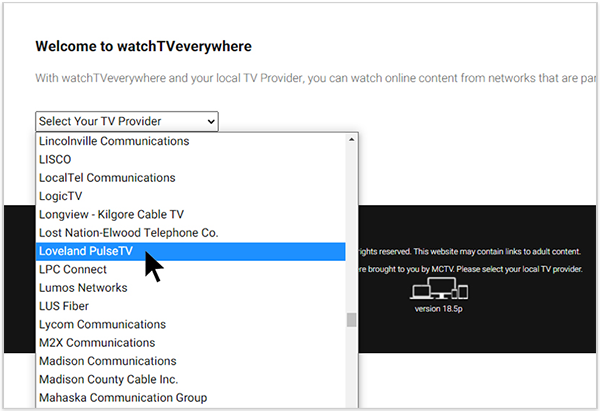
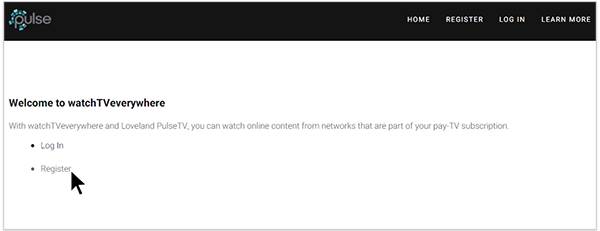
- Click “Register.” Note, you will need your Pulse account number to complete registration. Find it on your latest bill or call our Customer Service team at 970-541-4990 for assistance. Account number is displayed on your bill in format FFF-AAAAAA. Please enter the full number including any leading zeros and hyphens.
- Complete the user information fields, including your email and password. Your email will be your login for the TV Everywhere site or apps. You will use the same email/password to sign in on all devices for PulseTV Everywhere. Don’t forget to save your password in a safe location!
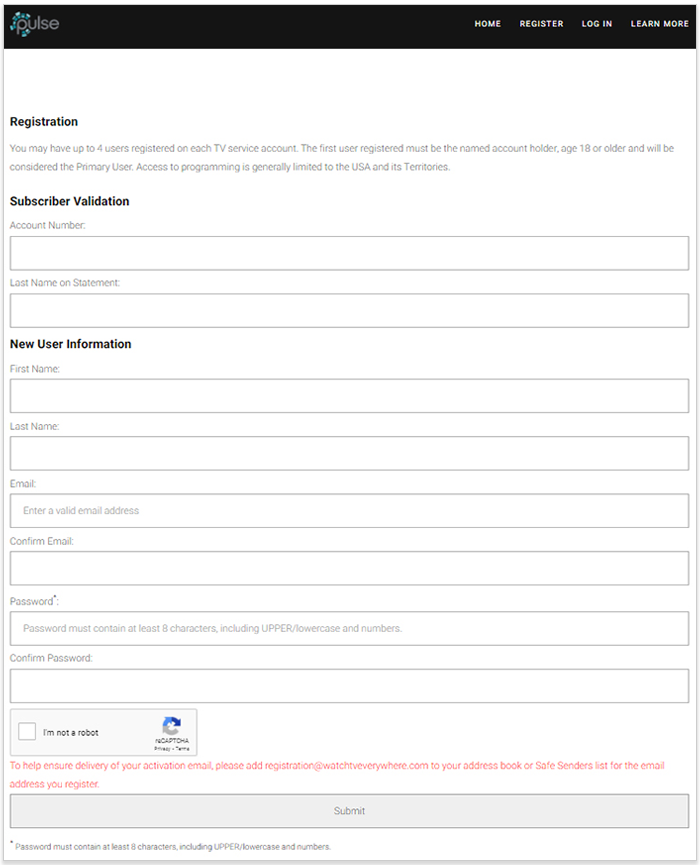
- When finished, hit the Submit button at the bottom of the page.
- An email with a link to complete the registration process will be sent to the email address you just used. You must click on the link in that email to complete and activate your registration.
How to Log In and Watch
Note: Access to channels is based on the PulseTV package you subscribe to.
- Go to www.wtve.net or click on the Watch Now button above.
- Select “Loveland PulseTV” from the dropdown box as your TV provider.
- Click “Log In.”
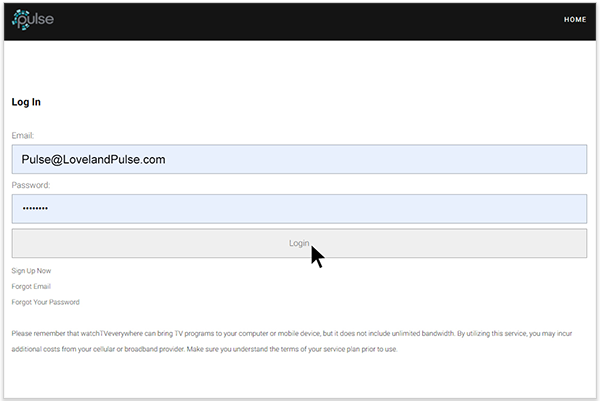
- Fill out the Email and Password you used to Register your TV Everywhere account. Then click the Login button.
- Make your selection from the available channels.
- Watch and enjoy!

A Few Things to Note:
-
- Access to the channels is based on the PulseTV package that you have subscribed to.
- Some channels provide live TV content and some provide a library of On Demand content.
- Some channels (HBO, FX, etc.) require you to both register with their site and link your PulseTV account.
- Depending on the device you are using, a network may require you to download their app to watch their content.
- Some networks will automatically recognize your PulseTV account, but you will have to re-enter your email and password for others.
- You can have 4 users registered for PulseTV Everywhere. The first user must be the named Pulse account holder, aged 19 or older, and will be considered the Primary User.
- Access to programming is limited to the USA and its territories.
Need help? Call us at 970-744-4226
Frequently Asked Questions
How do I use PulseTV Everywhere?
You first must register your PulseTV account at www.wtve.net.
After registering, Log In at www.wtve.net, and you will be presented with a list of networks that are available to you.
We have created a step-by-step tutorial for registering your account and logging in at pulsefiber.com/tv-everywhere-tutorial.
What can I watch?
Each network determines what programs to make available, when and the length of time they are available. PulseTV has no control over what is made available. Generally, networks have the most recent episodes of TV shows as well as past episodes or seasons of TV shows available for you to watch. They may also include movies, behind-the-scenes content or special, web-only content. Some networks even include a live stream of the network.
Please note you will only have access to channels that are in your subscription package. Check the Channel Lineup to see what channels are included in your PulseTV package.
Where can I watch PulseTV Everywhere?
PulseTV Everywhere works anywhere you can receive an Internet signal or sufficient cellular signal. Wired connections and in-home WiFi will provide the best quality. The quality of streaming while connected to a public WiFi network will vary depending on the strength of the signal. You may be charged for data usage by your mobile carrier.
Please note: most content authorized through PulseTV Everywhere is only accessible in the US and US territories.
How much does PulseTV Everywhere cost?
Nothing. PulseTV Everywhere is a service included with your PulseTV subscription at no additional cost. You’ll have access to networks that are part of your PulseTV subscription. For example, if you receive ESPN as part of your cable package, you’ll have access to ESPN content through ESPN.com or ESPN app.
Please note you will only have access to channels that are in your subscription package. Check the Channel Lineup to see what channels are included in your PulseTV package.
How is PulseTV Everywhere different than the PulseTV app?
You can use the PulseTV app for Android and iOS to watch some content on your mobile device only while connected to your home Pulse internet. With TV Everwhere, you can access content even when you’re away from home.
Will other networks become available?
Yes. We are continually working with networks to make them available through PulseTV Everywhere and expand what’s available to you. To see a complete list of networks that are currently available to you, log in to wtve.net
Please note you will only have access to channels that are in your subscription package. Check the Channel Lineup to see what channels are included in your PulseTV package.
Why aren’t all the networks I subscribe to available?
Not all networks and channels make their programs available online. As new networks are added, they will be added to PulseTV Everywhere.
Please note you will only have access to channels that are in your subscription package. Check the Channel Lineup to see what channels are included in your PulseTV package.
Why isn’t all content available?
Programming available from each participating cable network will vary. A TV network doesn’t necessarily own all of the rights to all of the programs they transmit. A TV network may have the right to transmit a movie, but only to TV sets, not through PulseTV Everywhere. So, availability of content depends on the TV network.
Please note you will only have access to channels that are in your subscription package. Check the Channel Lineup to see what channels are included in your PulseTV package.
How many different devices can I use?
There is no limit to the number of devices you can use. However, TV networks may limit the number you can use at the same time. Please refer to the policies and terms of use for each network you use for details.
Does watching PulseTV Everywhere count against my mobile data plan?
It might. Check the data plan for your cellular network before using PulseTV Everywhere on a smart phone or wireless network. Streaming programs transmit a lot of data. That can become expensive if you have a limited data plan. You are responsible for all data charges made by your mobile carrier.
Remember, if you are at home using your Pulse network, there are no data caps, so you can watch to your heart’s content!
Is there a single app I can use to access all PulseTV Everywhere content?
Each participating network provides their PulseTV Everywhere content separately on their own website or mobile app.
Is PulseTV Everywhere content available in HD quality?
Each participating network has their own policies about which shows are available in HD. Check with the network’s website for more information.
I need help setting up my PulseTV Everywhere account.
We have created a step-by-step tutorial for registering your account and logging in at pulsefiber.com/tv-everywhere-tutorial.
You also have 24/7 access to local technical support at 970-744-4226.

Get PulseTV Today
Our friendly, locally-based customer service representatives are available Monday – Friday 8 a.m. to 5 p.m.


 Pulse has been delivering cutting-edge internet service to our incredible community for FIVE YEARS! It’s been an amazing journey, and we’re just getting started. To mark this special occasion, you can lock in your price on our Trendsetting Techies 2-Gig internet for the next FIVE years! Click for details