




Symmetrical upload and download speeds
Never think about your internet again. Five plans built for how Northern Colorado families actually live online.
All Pulse Internet plans come with free installation, 24/7 support, and unmatched speeds on our ultra-reliable network.
Fiber 500
500 Mbps are recommended for:
- Couples and smaller families
- Light streamers and video callers
- A few smart home devices – up to 10
- Casual gamers
- Anyone ready to ditch slow cable uploads for good
Most Popular 5 year price lock
Power Fiber
2 Gigs are recommended for:
- Households with 4+ people
- Tech-heavy homes with up to 50 devices
- 4K streaming enthusiasts
- Multiple gamers
- Creative professionals and remote workers with heavy data needs
- The Together Alone crowd: five people in one room, staring at five different screens.
Best Value
Smart Fiber
1 Gig is recommended for:
- Average-sized families
- Homes with teenagers
- Up to 20 connected devices
- Remote workers
- The Undecided. If you’re unsure which plan to choose, start here.
Future Proof
Ultra Fiber
4 Gigs are recommended for:
- Tech pros
- Live streamers and competitive gamers
- Homes with 50+ connected devices
- Homes running home servers or labs
- Anyone who treats buffering like a personal insult.
Future Proof
Future Fiber
10 Gigs are recommended for:
- Professional creators
- Tech entrepreneurs and home-based startups
- Fully integrated smart homes with 50+ devices
- Anyone who wants their file downloaded before they even click “Save.”
Not Sure?
Talk to a local expert and we’ll help you choose what’s best for you.
What makes Pulse the ultimate home internet?

Unlimited data and no throttling
Stream and surf to your heart’s content.

Reliability
Our network maintains 99.995% uptime.

Unmatched symmetrical speeds
Upload and download speeds only Pulse can deliver.

No Long-Term Contracts
Hassle-free service and transparent pricing.

Local Commitment
We’re community-owned and operated, and here to serve.

24/7 support
Day or night, we’ll keep you connected.
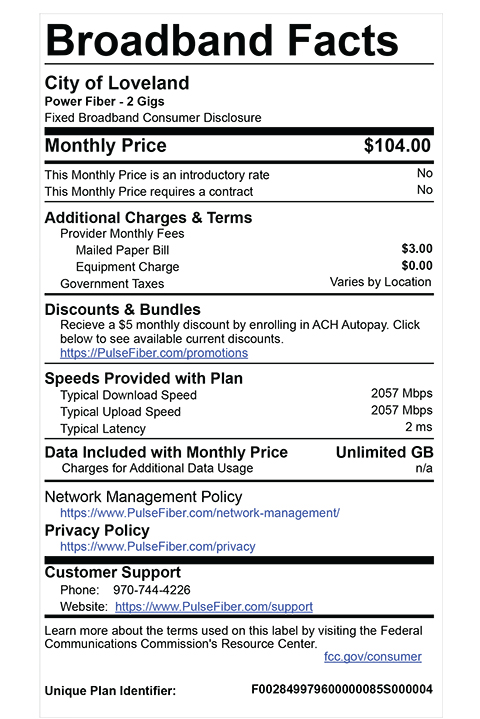
Get the facts
Broadband Labels provide clear and accurate information about the costs and performance of high-speed internet.
We don’t want to brag, but we’re the
Fastest Internet in Colorado
Pulse has been named the Fastest ISP in the West in 2023 and 2024 (and 2nd fastest in the nation!), and the Best Gaming Quality in the nation in 2024 and 2025. “For speed, people should move to Loveland to enjoy Pulse. Colorado has many great municipality-run ISPs with fiber-to-the-home, delivered as a utility that everyone can get inexpensively.” PCMag, Best ISPs 2024

Internet FAQ
What kind of equipment do I need?
Pulse residential internet service includes the ONT, which is our device that works like a modem and router in one. While you are welcome to use your own equipment if you have it, you don’t need to purchase anything new. Pulse has you covered.
Can I use my own router?
Yes. Your Pulse ONT (Optical Network Terminal) includes a WiFi gateway that will allow you to connect to WiFi directly from your device. But you are welcome to use your own router with Pulse services. To ensure you get the most from your Pulse service we recommend that your device should have a 1 Gbps ethernet internet interface, and an 802.11 AC router. It’s important to note that many older WiFi routers have a 100 Mbps interface which will not allow you to utilize the gigabit speeds Pulse enables.
What is a dual-band router?
Our ONT is what’s called a ‘dual-band’ router. This means that you have 2 frequencies of signal, or bands, to connect your devices to. A 2.4 GHz and a 5 GHz network. There are advantages and disadvantages to each and a proper way to maximize their potential.
Starting with the 2.4 GHz signal. This frequency is great at traveling a much farther distance through walls and floors. However, the signal speeds are going to be slower. The 2.4 GHz network is also more susceptible to device traffic. Meaning it will slow the more devices are connected to it. You would want to connect low-bandwidth devices to this network or devices that are farther from the ONT. For example; smart thermostats, smart home assistants (Amazon Alexa, Google Home, etc.), and printers.
The 5 GHz network is much more powerful but cannot reach as far or penetrate walls and floors as well. This network offers speeds four times faster than 2.4 GHz. It also can support more traffic, meaning more devices can be connected and used at the same time. To the 5 GHz network you will want to connect gaming consoles, streaming devices, and desktop computers.
Will Pulse give me a discount if I use my own router/WiFi gateway?
The Pulse ONT is a required piece of equipment necessary to tie into our 100% fiber-optic internet network. If you’d like our team to switch the WiFi Gateway element of the ONT into bridge mode so you can use your own wireless router, we would be happy to do that, but it will not alter the cost of your plan.
Will Pulse buy out my current contract with another provider?
As a city utility and not-for-profit organization, we are unable to buy-out contracts from for-profit entities. However, we have spoken with residents who have done their “early-cancellation math” and found that switching to Pulse still puts them ahead of the game.
We also understand it may make more sense for your family to catch up with us when your current contract is ready to end and, in that case, we look forward to connecting you with a new service when it’s the right time for you.
What is the difference between a megabit and gigabit?
Megabits (Mbps) and gigabits (gbps) are units of measurement for the speed in which information travels through the internet. Gigabits provide higher speed than megabits and 100 megabits are ten times faster than 10 megabytes. Make sense? That brings us to a bigger question that you might be asking – what is the internet? This short and simple video is a great little place to get a big picture idea of what the internet actually is.
What is the difference between Ethernet and WiFi?
With fiber, the fastest speeds and best connection comes with an Ethernet connection. Something to consider is what uses the most bandwidth in your home. Is it a gaming console, desktop computer, or your streaming device? To have the fastest speeds to those devices, use a wired Ethernet connection. If possible, reserve WiFi for mobile devices and low bandwidth products.
What‘s causing my WiFi interference - or, can I use my Pulse wireless service and another provider’s WiFi-enabled device in the same space?
You’ve heard of dueling banjos – now we’ll tell you about dueling wireless routers! When you have two wireless routers trying to serve the same area, this can be accomplished if both routers are on the same network. However, if you have one Pulse fiber-optic WiFi enabled ONT and a wireless router from ABC Internet company running in the same space, you are going to find that you a get very poor quality service and connectivity from both of your devices and providers.
If your goal is to compare your new (fiber-optic) Apples to your old (coaxial) Oranges, we suggest that you only have one of the wireless devices plugged in or switched on at any given time.
If you’ve got them both on, you’re going to find yourself frustrated with all of the internet fruit in your house.
Where is the best place to put my ONT?
Physical placement of our ONT, or your personal router, is important to maximize your internet speed. Pulse technicians will help you determine a place for your ONT that’s in a central location. You ideally want a visible ‘line-of-sight’ to your devices. The farther your device is from the ONT, the weaker the signal will be. Your ONT is recommended to be halfway between the ceiling and the floor. Most wood and drywall walls will not impact signal strength, but concrete, brick, and metal walls will reduce the signals ability to reach your device. Lastly, keep your router away from large appliances and mirrors.


 Pulse has been delivering cutting-edge internet service to our incredible community for FIVE YEARS! It’s been an amazing journey, and we’re just getting started. To mark this special occasion, you can lock in your price on our Trendsetting Techies 2-Gig internet for the next FIVE years! Click for details